Logitech MX Keys Review 2026 — The Best Wireless Keyboard for Productivity?
★★★★★4.6/ 5
By FutureFavs EditorsUpdated: May 2026ASIN: B09DKM9CJY
Update August 2026: the original MX Keys is no longer sold on Amazon — its listing reads “currently unavailable” with no sellers, and the ASIN previously shown on this page returns a 404. The buy buttons now point to the MX Keys for Business: the same Graphite, backlit, Perfect-Stroke keyboard reviewed below, shipping with a Logi Bolt receiver instead of Unifying. Everything here about the typing experience still applies — the receiver and the enterprise packaging are the difference.
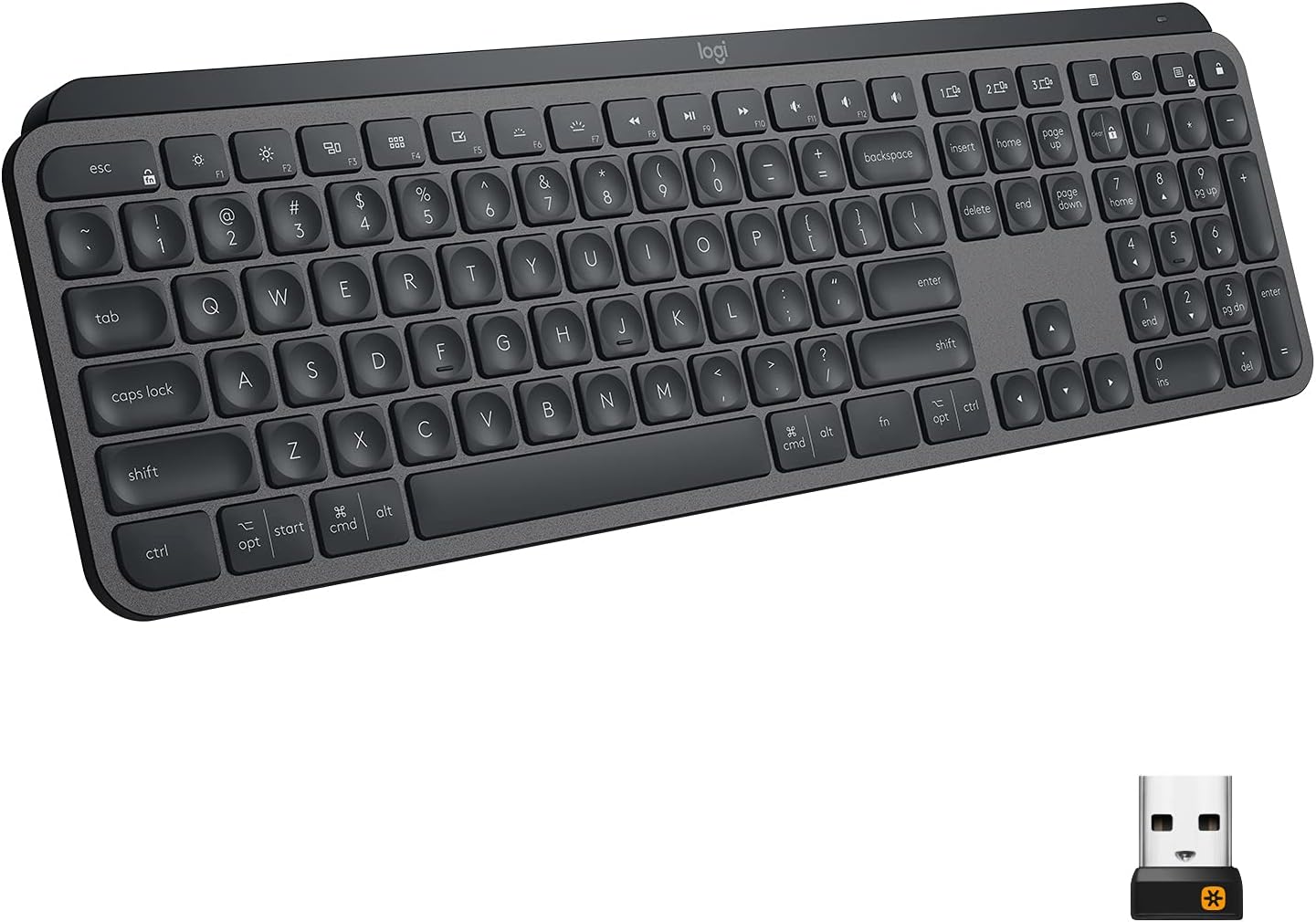
The Logitech MX Keys is the definitive wireless keyboard for professionals who value comfort over clicky feedback. Its spherically-dished keys, smart backlighting, and seamless three-device switching make it the go-to choice for writers, developers, and business users working across Mac and Windows. At €99, it's priced fairly for what it delivers — though hardcore typists may prefer a mechanical board like the Keychron K2 Pro (see our best mechanical keyboard under €150 guide). It also pairs perfectly with the Logitech MX Master 3S via Logitech Flow.
9.2
Typing Comfort
9.0
Build Quality
9.5
Multi-Device
8.8
Battery Life
8.5
Value
9.1
Overall
Logitech MX Keys
€99
Available on Amazon — usually ships next day
FutureFavs earns a commission on qualifying purchases at no extra cost to you.
Official Logitech MX Keys unboxing — Smart Backlight, Logi Bolt receiver and Flow multi-device switching covered in our review.
Why the MX Keys Still Leads in 2026
Logitech introduced the MX Keys in 2019 and updated it through 2022, yet it remains the best-selling premium wireless keyboard in Europe. Why? Because it occupies a specific niche brilliantly: quiet, comfortable, multi-device wireless typing for professionals who aren't interested in the enthusiast mechanical keyboard rabbit hole.
In a market now flooded with hotswap boards, gasket-mount keyboards, and custom builds, the MX Keys represents the opposite philosophy — a finished, thoughtfully engineered product you take out of the box, connect, and never have to think about again. For most professionals, that's exactly what they need.
Design and Build Quality
The MX Keys is built from a heavy ABS plastic shell with an anodised aluminium top plate — the same matte dark graphite or pale grey finish that's become Logitech's signature for their MX line. It weighs 810 g, which is substantial for a wireless keyboard, but that heft contributes to stability on the desk. It doesn't slide, even without a wrist rest.
The key layout is full-size with a number pad. Logitech also makes the MX Keys Mini (75% form factor) and the MX Keys S (a 2023 refresh with minor changes and slightly lighter actuation), but the original full-size MX Keys remains the most popular variant for desk setups.
One standout detail: the keycaps have spherically-dished surfaces — each key is subtly concave to match the curvature of a fingertip. Logitech designed this specifically to reduce lateral finger slip during fast typing, the kind of detail that tends to matter more the longer a typing session runs.
Typing Experience
The MX Keys uses Logitech's own low-profile scissor switches with 1.8 mm travel and an actuation force of around 45 gf. This is noticeably shallower than mechanical keyboards (typically 3.5–4 mm travel) but deeper than most laptop keyboards. The result is a smooth, quiet keystroke that feels crisp without the mushy collapse you get on cheaper scissor keyboards.
If you're coming from a mechanical board with clicky or tactile switches, the MX Keys will feel understated — there's no audible feedback, and the tactile bump is minimal. But if you're coming from a laptop keyboard or a budget membrane desktop board, the MX Keys will feel dramatically better. It sits in a comfortable middle ground that most users find highly productive for long typing sessions.
The scissor-switch mechanism is inherently quieter than mechanical switches by design, which is why low-profile chiclet-style keyboards like this one are generally the considerate choice for an open-plan office, a shared apartment, or video calls.
Smart Illumination
The MX Keys has a proximity sensor beneath the space bar that detects when your hands approach and activates the backlight — and turns it off when you move away. In a dark room, this works surprisingly well and saves significant battery power compared to always-on backlighting.
The backlighting itself is white only (no RGB), with adjustable brightness through function keys. It's adequate for low-light use but not particularly impressive compared to gaming keyboards with per-key RGB. For productivity users, white backlight is cleaner and less distracting.
Multi-Device Pairing — The Killer Feature
The MX Keys supports three simultaneous device pairings via Bluetooth (or Logi Bolt USB receiver for one device). Switching between devices is as simple as pressing Easy-Switch buttons (F1, F2, F3) on the top of the keyboard. Switching takes under a second.
For users who work across a Mac, a Windows PC, and a tablet — or across a laptop and a desktop — this is genuinely transformative. You no longer need multiple keyboards. The keyboard also adapts its key labels: when connected to a Mac, Cmd and Option are correctly labelled and function as expected. On Windows, the layout switches to Ctrl and Alt. Function row shortcuts (screenshot, Mission Control, Exposé) adjust accordingly.
This cross-platform intelligence is something few competitors match at this price point. The Microsoft Surface Keyboard and Apple Magic Keyboard both handle their respective ecosystems better in isolation, but neither handles multi-device cross-platform switching as elegantly as the MX Keys.
Battery Life
Logitech claims up to 10 days with backlighting on and up to 5 months with backlighting off. Where you land between those two figures depends almost entirely on how much you use the backlight — leaving the proximity sensor to manage it is what pushes the number toward the longer end.
Charging is via USB-C, which is a relief — no proprietary cables. A full charge takes about 2 hours, and the keyboard gives low-battery warnings well in advance through the Logi Options+ software.
Software: Logi Options+
Logi Options+ (the successor to Logitech Options) provides per-app customisation of the function row and special keys. You can assign different shortcuts to F-keys depending on whether Chrome, VS Code, or Excel is in focus. For power users, this is a meaningful productivity multiplier.
The software is optional — the keyboard works fine without it — but it's worth installing if you want to squeeze extra efficiency from the function row. It's available for Mac and Windows, and works reliably without the bloat associated with gaming peripheral software.
MX Keys vs. Alternatives — Full Comparison
Keyboard
Price
Switch Type
Travel
Multi-Device
Battery
Best For
Logitech MX Keys Our Pick
€99
Scissor low-profile
1.8 mm
3 devices
10 days–5 mo
Multi-device pros
Keychron K2 Pro
€99
Mechanical (hot-swap)
4.0 mm
3 devices
4000 mAh
Typing enthusiasts
Apple Magic Keyboard
€109
Scissor
1.0 mm
1 device
1 month
Apple-only users
Microsoft Sculpt Ergonomic
€89
Membrane
2.0 mm
1 device
AAA batteries
Ergonomics first
Logitech MX Keys S
€109
Scissor low-profile
1.8 mm
3 devices
10 days–5 mo
MX Keys + lighter actuation
MX Keys Mini
€79
Scissor low-profile
1.8 mm
3 devices
10 days–5 mo
Minimal desk setups
Pros and Cons
What We Love
Spherically-dished keys reduce typing fatigue
Effortless 3-device switching (sub-1-second)
Works perfectly across Mac and Windows
Smart backlighting with proximity sensor
USB-C charging (modern standard)
Excellent Logi Options+ per-app customisation
Extremely quiet — office and call friendly
Premium build with aluminium top plate
What Could Be Better
No mechanical feedback option
No hot-swappable switches
Full-size only (no compact without going Mini)
White backlight only — no RGB
Premium price vs. budget wireless alternatives
Relatively heavy at 810 g
Who Should Buy the MX Keys?
Buy it if: You work across multiple devices (laptop + desktop, or Mac + Windows), you need a quiet keyboard for shared spaces, you want premium build quality without the complexity of mechanical enthusiast boards, and you're happy spending €99 on a keyboard you'll use every day for years.
Skip it if: You're a mechanical keyboard enthusiast who loves tactile or clicky feedback, you want hot-swappable switches to experiment with, you only ever use one device, or you're on a budget (the MX Keys Mini at €79 or a Keychron C1 at €55 serve budget-conscious buyers well).
Match your buyer type to the right board
"Buy it if / skip it if" only gets you so far when several Logitech and non-Logitech boards sit within a few euros of each other. Here's a criteria-based framework built from each board's published specs, not a ranked "best" list:
The multi-device professional (laptop + desktop, or Mac + Windows on the same desk): the deciding criterion is Easy-Switch device count and cross-OS software support. The MX Keys and MX Keys S both handle 3 devices with sub-second switching — the Keychron K2 Pro also supports 3 devices over Bluetooth, but has no equivalent to Logi Options+ per-app function-row remapping. If cross-platform software polish matters as much as the hardware, that tips it toward the MX Keys line.
The minimal-desk / travel user: the deciding criterion is footprint and weight. The MX Keys Mini keeps the same 1.8mm scissor switches and 3-device switching as the full MX Keys at €20 less, in a smaller frame — worth it unless you specifically need the dedicated function row and numpad the full-size board adds.
The typing-feel enthusiast: the deciding criterion is switch type and customisability, not price. The Keychron K2 Pro's hot-swappable mechanical switches (4.0mm travel vs. the MX Keys' 1.8mm) and full QMK/VIA remapping are the only option in this group that lets you change the physical feel later — the MX Keys' scissor switches are fixed for the keyboard's life.
The single-device budget buyer: if Easy-Switch multi-device pairing isn't a criterion you'll actually use (one computer, staying that way), none of the MX Keys family's premium is buying you anything — a Keychron C1 (€55) or another single-device board covers the same typing surface for less.
The Value Calculation
At €99, the MX Keys costs roughly €0.27/day over a year — about the price of a third of a coffee. Considering that keyboard comfort directly affects how many hours you can type before fatigue sets in, and that knowledge workers spend 6–8 hours/day at their keyboards, the per-hour cost of this keyboard is negligible compared to its impact on daily output.
Compared to the Apple Magic Keyboard (€109, single device only) or the Microsoft Surface Keyboard (€119, also single device), the MX Keys delivers more value through its multi-device capability alone. If you own two computers, the MX Keys effectively replaces two separate keyboards.
Final Verdict
The Logitech MX Keys remains the benchmark wireless productivity keyboard in 2026. Its thoughtful engineering — spherical key dishes, smart backlighting, cross-platform multi-device pairing — makes it the easiest keyboard recommendation for professionals who want something that simply works brilliantly every day. At €99, it's worth every cent.
Rating: 4.6 / 5 — Highly Recommended
Logitech MX Keys
€99
Free returns · Usually ships within 1 day
FutureFavs earns a commission on qualifying purchases at no extra cost to you.