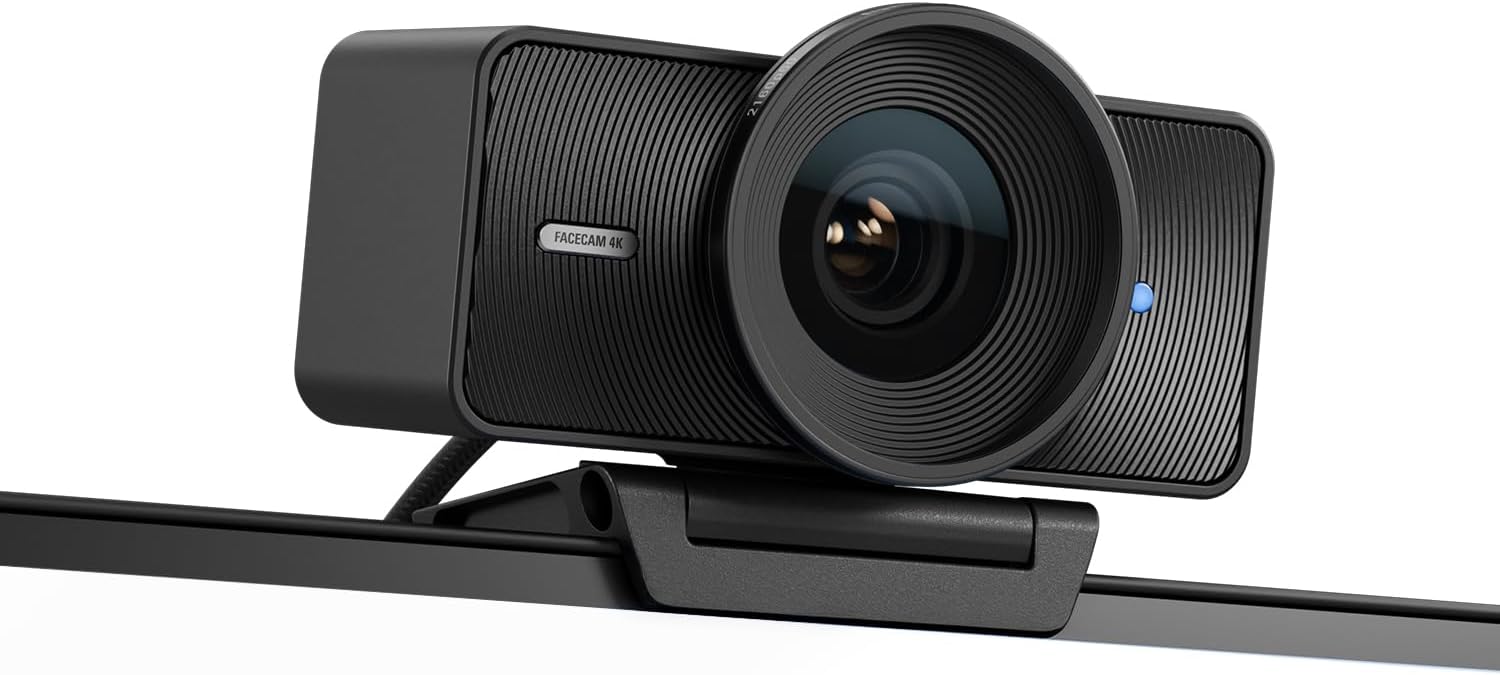
Elgato Facecam 4K Webcam — manufacturer/retailer product photo.
Listen to the verdict
Verdict
Elgato did something unusual with the Facecam 4K: it decided what this camera would be bad at, on purpose. There is no microphone, because the hardware budget went to the sensor. There is no autofocus, because a fixed lens cannot hunt mid-sentence. And the lens is f/4.0 — more than a stop darker than the f/2.4 optics on Elgato's own cheaper models — because a slower lens buys sharpness across the frame. Every one of those is a defensible engineering call, and together they produce a picture that no other webcam matches: a 1/1.8-inch Sony STARVIS 2 sensor behind an Elgato Prime lens, with manual ISO, shutter, LUTs and a genuine 49 mm filter thread in front of it. It also means the camera arrives with homework. Light your desk. Sit between 30 and 120 cm from it. Bring your own mic. Do all three and $199.99 buys the closest thing to a real camera that plugs in over USB-C. Skip one and the $139.99 Facecam MK.2 will make you look better.
Watch before you buy
TerryDoesTech — independent review
An independent review from the TerryDoesTech channel, published under the title "This needs some work. | Elgato Facecam 4k Review" — worth watching precisely because the title is not a launch-day rave.
What Elgato Actually Built
Strip the marketing away and the Facecam 4K is a single-purpose imaging device. The sensor is a 1/1.8-inch Sony STARVIS 2 CMOS — physically large for a webcam, and the reason the picture holds together when you crop into it. In front of it sits Elgato's own Prime lens: 21 mm, f/4.0, fixed focus, with a 90° field of view. Behind it is a processing pipeline that can push 2160p60 down a USB-C cable, plus on-device flash memory so your settings survive being unplugged and moved to another machine.
What it does not have is as informative as what it does. There is no microphone — Elgato's own copy says the camera is "stripped of wasteful parts like a microphone" — no privacy shutter in the box beyond the mount design, and no autofocus motor. The camera ships with a monitor mount, a 200 cm detachable USB-C to USB-C 3.0 cable, and a 1/4-inch thread on the underside so it can go on an arm or a tripod instead.
The software is the other half of the product, and it is free. Camera Hub (Windows and Mac) exposes manual exposure via ISO and shutter speed, digital PTZ, HDR, cinematic LUTs, background blur, noise reduction and a dedicated low-light mode. This is the part that separates the Facecam from every "4K webcam" on a marketplace listing: those cameras give you a resolution number and an auto-everything image pipeline you cannot argue with. This one hands you the controls, and then holds you responsible for the result.
The Three Conditions Nobody Puts on the Box
Every honest review of this camera is really a review of its constraints, so let us take them in order of how many buyers they will catch out.
1. f/4.0 means you need light. This is the single most consequential spec on the sheet and the one least likely to be read. Elgato's cheaper Facecam MK.2 and Facecam Neo both use f/2.4 lenses. Going from f/2.4 to f/4.0 costs roughly a stop and a half of light — the Facecam 4K is working with well under half the light of its cheaper siblings for the same scene. The big STARVIS 2 sensor claws a lot of that back, and Camera Hub's low-light mode claws back more, but physics does not negotiate: in a dim room the camera raises ISO, noise rises, noise reduction kicks in, and fine detail — the entire reason you bought a 4K camera — is the first thing to go. It is not a coincidence that the first question in Elgato's own product FAQ is about lighting, or that Elgato sells key lights. If your desk is lit by one overhead bulb at 9pm, this is the wrong camera or you need to fix the lighting first.
2. Fixed focus means you sit where it can see you. Elgato quotes 30–120 cm (11.8–47.2 in) at 4K, widening to 25 cm–infinity at 1080p. For a person at a desk that is a generous envelope and the trade is a good one — fixed focus cannot hunt, breathe, or soft-focus your face because you leaned back. But it is a hard boundary. Standing up to demo something, filming a second person further back in the room, or pointing the camera at a whiteboard are all outside the design brief at 4K. Buy this camera for a talking head at a desk; do not buy it to be flexible.
3. No microphone means the budget is bigger than $199.99. If you already own a Shure MV7+ or a Røde NT-USB Mini, this is a feature — one less mediocre mic in your input list. If you were planning to replace an aging all-in-one webcam and be done, the real cost of this setup is the camera plus a microphone, and at that point a cheaper camera plus a better mic is almost always the stronger buy. Audio quality moves perceived production value further than resolution does, every time.
"4K60" and "Uncompressed" Are Both True — Just Not Together
This is where the marketing needs a translator, and it matters for anyone recording locally.
Over USB 3.0 the Facecam 4K supports 2160p60 — but Elgato's own specification annotates that mode MJPG only, meaning compressed. The uncompressed formats, NV12 and YUY2, are available at 2160p30 and 1440p60 and below. HDR is supported at 2160p30 and below. And if you plug into a USB 2.0 port, the whole thing collapses to 1080p60 and MJPEG only.
So the honest reading of the spec sheet is: 4K at 60 fps, or uncompressed 4K at 30 fps, or uncompressed 1440p at 60 fps — pick one. None of those is a bad option; the problem is a buyer who reads "4K60" and "uncompressed video" on the same product page and assumes they arrive together. They do not, and the difference shows up in exactly the workflow that justifies the camera: recording clean local footage for an edit.
There is a second practical consequence. Uncompressed 4K over USB is an enormous amount of data, and it lands on your CPU rather than being decoded from a compressed stream. On a modern machine this is fine. On a five-year-old laptop already running a stream, an encoder and a browser full of tabs, it is a real load. Check your port is USB 3.0 before you check anything else — the cable in the box is a USB-C 3.0 cable for a reason.
The 49 mm Filter Thread Is the Most Interesting Thing Here
Elgato claims the Facecam 4K is the first webcam to support standard 49 mm lens filters, and it's arguably the feature that best justifies the premium. It sounds like a novelty until you consider what a filter is: a piece of optical glass that does something in front of the lens that no amount of post-processing does convincingly.
A circular polariser kills reflections off glasses and glossy surfaces behind you — the single most common thing that makes a home-office shot look amateur, and something no software filter can undo. A black mist or pro-mist filter softens skin tones and blooms highlights, which is why it lives on half the cinema lenses you have ever watched. A star filter turns point lights into spikes, which is a look, if it is your look.
What makes this genuinely useful rather than a gimmick is that 49 mm is a real, common photographic filter size. You are not locked into an Elgato accessory ecosystem — any 49 mm filter from any camera brand screws on. That is a rare piece of open design in a category obsessed with proprietary mounts, and it is the clearest signal that Elgato built this thing for people who think like camera owners.
One caveat worth stating: a polariser costs you light, typically one to two stops of it. On an f/4.0 lens in an average room, adding a CPL without adding a light is how you turn a great camera into a noisy one. Filters and lighting are a package deal here, not alternatives.
Where It Sits in Elgato's Own Lineup
The Facecam 4K's toughest competition is not Logitech. It is the two cheaper cameras Elgato sells beside it, both of which have a brighter lens.
| Camera | List price | Max capture | Uncompressed ceiling | Lens | Sensor |
|---|---|---|---|---|---|
| Facecam 4K | $199.99 | 4K60 (MJPG) | 2160p30 / 1440p60 | f/4.0, 21 mm, 90°, fixed | Sony STARVIS 2, 1/1.8" |
| Facecam MK.2 | $139.99 | 1080p60 | 1080p60 | f/2.4, 24 mm eq., 84°, fixed | Sony STARVIS, 1/2.5" |
| Facecam Neo | $39.99 | 1080p60 | 1080p60 | f/2.4, 84°, fixed | Not published by Elgato |
List prices and specifications taken from elgato.com (US store) on 6 August 2026 and subject to change; the Facecam Neo in particular is priced well below its launch RRP at the time of writing. Uncompressed formats (NV12 / YUY2) require a USB 3.0 connection on all three cameras; over USB 2.0 all three fall back to MJPEG.
Read that table as a buyer rather than a spec-sheet collector and something awkward emerges. The $60 gap between the MK.2 and the 4K buys you resolution and a filter thread, and costs you a stop and a half of lens speed. Twitch caps most streams at 1080p60. Zoom, Teams and Google Meet transmit far less than that. YouTube will take your 4K, but only if you are recording locally and editing rather than going live. So the resolution is worth real money to one specific person — the creator who records, crops, zooms and edits — and worth almost nothing to the person on four video calls a day, who would be better served by the brighter lens.
Outside Elgato's range, the two cameras we would cross-shop are the Logitech Brio 4K, which has autofocus and a built-in mic and is the safer pick if you need one device to do everything, and the Insta360 Link 2, whose gimbal and AI tracking solve the exact problem the Facecam's fixed lens creates — moving around. If your budget is the constraint rather than the image, the Logitech C920 remains the sensible floor, and our best webcam under $100 guide covers that end properly.
Living With It: Mounting, Software and the Colour Question
Three things that only become obvious after the box is open.
The 1/4-inch thread is the mount that matters. The included monitor mount is fine, and at 112 g (104 × 54 × 52 mm) the camera is light enough not to bow a thin bezel. But the fixed 30–120 cm focus range means placement is not cosmetic — it is the difference between a sharp shot and a soft one. A 1/4-inch thread means you can put it on a desk arm, a tripod, or above a monitor at the height that flatters you, rather than accepting wherever the clip lands. Use it.
Camera Hub is not optional in practice. The camera works plug-and-play as a UVC 1.5 device, and Windows will happily use it with no software at all. But every reason to spend $199.99 rather than $139.99 — manual ISO and shutter, HDR, LUTs, digital PTZ, low-light mode, the noise-reduction and dynamic-range controls — lives in Camera Hub. The saving grace is the on-device flash memory: dial your settings in once and the camera carries them, so a laptop you plug into at a client site gets the good picture without an install.
It comes in four colours, which sounds trivial and is not, because a webcam sits at eye level on your monitor in every shot of your working life. A black camera on a black bezel disappears; a white one on a white desk setup does the same. It is the sort of detail Elgato gets right and most webcam makers never consider.
✓ Pros
- Large 1/1.8-inch Sony STARVIS 2 sensor — the picture holds up when you crop or zoom into it
- 49 mm filter thread accepts any standard photographic filter, not a proprietary accessory
- Camera Hub gives real manual control: ISO, shutter, HDR, LUTs, PTZ, noise reduction
- On-device flash memory carries your settings to any machine, no software install needed
- Fixed focus never hunts, breathes or drifts mid-sentence
- 1/4-inch thread plus a monitor mount and a 200 cm detachable USB-C 3.0 cable in the box
- Four colourways, so it can actually disappear into your setup
- 112 g and 104 mm wide — light enough for a thin bezel or a slim arm
✗ Cons
- f/4.0 is more than a stop darker than Elgato's own cheaper cameras — it needs a lit desk
- No microphone at all, so the real budget is the camera plus a mic
- 4K60 is MJPG-compressed only; uncompressed tops out at 2160p30
- Fixed 30–120 cm focus range at 4K rules out whiteboards, demos and moving around
- USB 2.0 drops you to 1080p60 MJPEG — check your port before you buy
- Most live platforms will not transmit the resolution you are paying for
- $60 more than the Facecam MK.2 for a benefit many buyers will never see
Technical Specifications
| Sensor | Sony STARVIS 2 CMOS, 1/1.8" |
| Optics | Elgato Prime Lens |
| Aperture | f/4.0 |
| Focal length | 21 mm |
| Focus type | Fixed |
| Focus range | 30–120 cm (11.8–47.2 in) at 4K; 25 cm–infinity at 1080p |
| Field of view | 90° |
| Video resolutions (USB 3.0) | 2160p60 (MJPG only), 2160p30 (NV12/MJPG), 1440p60 (NV12/MJPG), 1440p30, 1080p60/30, 720p60/30, 540p60/30 |
| Video resolutions (USB 2.0) | 1080p60/30, 720p60/30, 540p60/30 |
| Video encoding | YUY2, NV12, MJPG (USB 3.0); MJPEG only otherwise |
| HDR | 2160p30, 1440p30, 1080p30, 720p30, 540p30 |
| Microphone | None |
| Connection | USB Type-C; UVC standard v1.5 |
| Mounting point | 1/4-inch thread |
| Supported filters | 49 mm |
| Dimensions | 104 × 54 × 52 mm (4.1 × 2.1 × 2.0 in), without mount |
| Weight | 112 g (0.25 lb), without mount and cable |
| In the box | Facecam 4K, monitor mount, detachable 200 cm USB-C to USB-C 3.0 cable |
| Software | Camera Hub (free, Windows and Mac); settings stored in on-device flash memory |
| Build | Made with recycled plastic (Elgato) |
Specifications from Elgato's published product data (elgato.com, US store) as of 6 August 2026. Claims attributed to Elgato are the manufacturer's own figures and marketing statements, not independent measurements.
Elgato Facecam 4K: Common Questions
Do you need extra lighting? In most rooms, yes. The f/4.0 lens gathers substantially less light than the f/2.4 optics on the cheaper Facecam MK.2 and Neo. The large STARVIS 2 sensor and Camera Hub's low-light mode compensate a long way, but in a dim room the camera lifts ISO and noise reduction begins removing the fine detail you bought the camera for. Lighting is not an accessory for this camera; it is part of the purchase.
Does it have a microphone? No — deliberately. Elgato removed it to spend the hardware budget on the image. Excellent if you already own a mic, a hidden cost if you do not.
Is it really uncompressed 4K60? No. 2160p60 is MJPG-compressed; uncompressed NV12/YUY2 runs to 2160p30 and 1440p60. Both claims are true, but of different modes.
Autofocus or fixed focus? Fixed, with a 30–120 cm working range at 4K (25 cm to infinity at 1080p). It cannot hunt or drift, and it also cannot follow you around the room.
Facecam 4K or the cheaper MK.2? Take the $139.99 MK.2 unless you can name your reason for 4K — cropping or zooming into the frame, recording locally for an edit, or wanting the 49 mm filter thread. Otherwise the brighter lens is the better camera for a desk.
Who Should Buy the Elgato Facecam 4K?
Buy it if you: record video at a desk and edit it afterwards — this is the camera's home ground, where 4K capture buys you the freedom to crop, reframe and punch in without the image falling apart. Buy it if you stream and use digital PTZ or a zoomed camera source, because the extra pixels are being spent rather than thrown away. Buy it if you already own good audio and a lit desk, because then the two things this camera does not do are things you have already solved. And buy it if the filter thread appeals to you for a specific reason — killing glasses glare with a CPL is a genuinely better result than any software has managed.
Consider alternatives if: your room is dim and you are not going to change that, in which case the Facecam MK.2 at $139.99 will look better than the Facecam 4K and cost you $60 less. If you need one device for calls with no extra gear, the Logitech Brio 4K has autofocus and a microphone and asks nothing of you. If you move around, demo objects to the lens or present at a whiteboard, the Insta360 Link 2 and its gimbal solve the problem a fixed lens creates. And if the real goal is simply to look better on calls, spend the money on a key light and a decent microphone before you spend it on sensor size — that order of operations improves the picture more, for less.
The $199.99 calculation: a webcam is one of the few pieces of desk hardware whose output other people see every single day. Framed over the four or five years one of these survives, $199.99 is a few dollars a month for how you appear to every client, colleague and viewer — trivially worth it. The counter-framing is just as true: $139.99 buys 85% of this camera with a brighter lens and no homework, and the remaining 15% only exists if you record, crop or filter. This is not a camera that rewards buying the top of the range by default. It rewards knowing why you want it.
Buy the Elgato Facecam 4K
$199.99 list · Four colourways · Available on Amazon with fast Prime delivery
Check Price on Amazon See Colour Options